Table of Contents
Design of Precast Prestressed Composite Beams – Free Excel Spreadsheet
What Is the Precast Prestressed Composite Beam Design Spreadsheet?
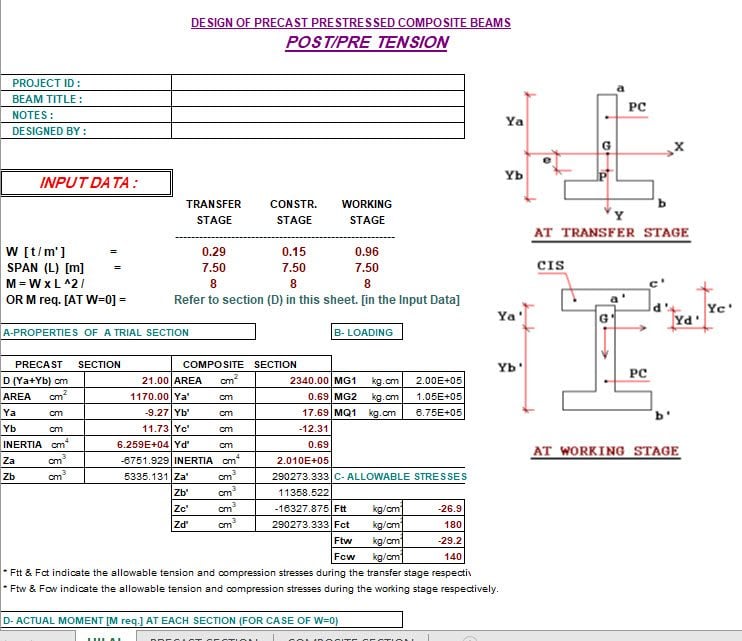
This free Precast Prestressed Composite Beam Design Excel spreadsheet is a professional structural engineering tool that helps engineers design composite beam systems combining precast prestressed concrete units with cast-in-situ concrete slabs.
This type of composite construction offers significant advantages in speed, cost, and structural performance. As a result, engineers widely use it for bridges, parking structures, industrial floors, and multi-story buildings. Furthermore, this spreadsheet brings together all the key design checks into one organized, formula-driven Excel workbook — saving hours of manual calculation.
Who Is This Tool For?
This spreadsheet is ideal for:
- Structural and civil engineers designing precast concrete floor and bridge systems
- Precast concrete specialists optimizing prestressed beam layouts and composite action
- Building designers working on cost-effective long-span floor solutions
- Bridge engineers applying composite prestressed beam systems to highway structures
- Engineering students studying prestressed concrete design and composite construction principles
What Is Precast Prestressed Composite Construction?
Precast prestressed composite construction combines two concrete elements that work together as a single structural unit:
1. The Precast Prestressed Concrete Unit Engineers manufacture these beams in a controlled factory environment using pre-tensioning. Because they produce the precast element off-site, they achieve rigorous quality control and higher mechanical properties at relatively low cost. Furthermore, the precast unit contains the bulk of the reinforcement, so it arrives on site ready to perform structurally from day one.
2. The Cast-In-Situ Concrete Slab After erecting the precast units, workers pour the cast-in-situ slab directly on top. Importantly, the precast beams support the formwork for the slab without additional scaffolding or shoring. As a result, the construction process becomes faster and more cost-effective compared to fully in-situ systems.
Together, these two elements form a composite section with greater strength and stiffness than either component alone.
Key Advantages of This Construction Method
No Additional Scaffolding Required
Engineers erect the precast prestressed units first. Consequently, these units directly support the formwork for the cast-in-situ slab. This approach eliminates the need for temporary propping or shoring, which significantly reduces construction time and cost on site.
Superior Load Distribution
The cast-in-situ slab acts as a wide, continuous plate across the top of the precast beams. Therefore, it provides an effective means to distribute loads in the lateral direction — improving structural redundancy and reducing peak stresses in individual beams.
Continuity Over Supports
Workers can pour the cast-in-situ slab continuously over the supports of precast units placed in series. As a result, this converts what would otherwise be a simple-span system into a continuous beam system, reducing midspan moments and improving deflection performance significantly.
Cost-Effective Pre-Tensioning
Pre-tensioning in a controlled plant environment is more cost-effective than post-tensioning on site. Additionally, factory production allows for tighter tolerances, better curing conditions, and more consistent quality throughout each precast unit.
High Quality at Low Cost
Because the factory produces the precast prestressed element and incorporates the bulk of the reinforcement there, workers achieve rigorous quality control and superior mechanical properties at relatively low cost. In contrast, the cast-in-situ concrete slab does not need to have high mechanical properties. Therefore, it works well with standard field concrete mixes and typical site conditions.
Key Features of the Excel Spreadsheet
- Full composite section design — combines precast prestressed unit and cast-in-situ slab into one composite section for analysis
- Pre-tensioning design — calculates prestress force, eccentricity, and tendon layout for the precast unit
- Composite section properties — computes transformed section properties accounting for different concrete strengths in the precast and in-situ elements
- Flexural design checks — verifies bending capacity at transfer, at service, and under ultimate loads for both the precast-only and composite stages
- Shear design — calculates shear capacity of the composite section including interface shear between precast and in-situ concrete
- Deflection calculations — checks short-term and long-term deflections at each loading stage
- Continuity analysis — supports design of continuous composite systems where the slab pours over intermediate supports
- Stress checks at transfer — verifies concrete stresses in the precast unit at the point of prestress transfer before composite action develops
- No macros required — runs entirely on standard Excel formulas
- Free to download — no license or subscription needed
Design Stages Covered
The spreadsheet guides engineers through all critical design stages of precast prestressed composite construction:
Stage 1 — At Transfer The precast unit carries its self-weight alone immediately after prestress transfer. At this stage, the program checks concrete stresses at the top and bottom fibre against allowable limits to ensure the precast element remains undamaged before erection.
Stage 2 — Precast Unit Erecting & Slab Casting After erection, the precast unit supports its self-weight plus the wet slab load. Furthermore, because workers provide no temporary propping, the precast section alone resists these construction-stage loads. The spreadsheet checks stresses and deflections at this stage accordingly.
Stage 3 — Composite Section Under Service Loads Once the in-situ slab gains sufficient strength, the composite section resists all subsequent imposed loads. As a result, the spreadsheet applies service loads to the full composite section and checks stresses, moment capacity, and deflection against code limits.
Stage 4 — Ultimate Limit State Finally, the program verifies the ultimate moment and shear capacity of the composite section under factored loads, ensuring full code compliance.
How to Use the Spreadsheet
Follow these steps to complete your composite beam design:
- Download the Excel workbook
- Input precast beam geometry — cross-section dimensions, span length, and support conditions
- Define prestressing details — tendon profile, number of strands, and prestress force
- Enter concrete properties — strength and elastic modulus for both precast and in-situ concrete
- Define loading — self-weight, slab weight, superimposed dead loads, and imposed live loads
- Review stage-by-stage outputs — stress checks, moment capacities, and deflections at each construction and service stage
- Check shear and interface shear — verify composite shear capacity between the two concrete elements
- Review the summary sheet — all design checks in one place for documentation and reporting
Frequently Asked Questions
What type of construction does this spreadsheet cover? The tool covers precast prestressed composite beam design, where a factory-made pre-tensioned concrete beam acts compositely with a cast-in-situ concrete slab poured on top.
Does the spreadsheet handle continuity over supports? Yes. The tool supports the design of continuous composite systems where the in-situ slab pours over intermediate supports, converting simple spans into a continuous structural system.
Can I use this for bridge design? Yes. The composite prestressed beam system suits both building floors and bridge decks. However, always verify that the specific code requirements for your project apply before using the results in design documentation.
Is pre-tensioning different from post-tensioning in this context? Yes. This spreadsheet focuses on pre-tensioning, where workers stress the tendons in the factory before casting the concrete. Post-tensioning, on the other hand, happens after casting and typically on site. Pre-tensioning is generally more cost-effective for precast elements.
Is the spreadsheet free? Yes, it is completely free to download and use.
What Excel version do I need? The spreadsheet works with Microsoft Excel 2007 and later, including Excel 2010, 2013, 2016, 2019, and Microsoft 365.
Download the Free Precast Prestressed Composite Beam Design Spreadsheet
Stop calculating composite beam designs by hand. Instead, download this free Excel spreadsheet and complete your precast prestressed composite beam design accurately and efficiently today.